Google AI Mode: What It Means for Your Business Website (and How to Show Up)
Google AI Mode is changing how customers find businesses. Here is what it means for your website and my practical checklist to show up in its answers.

Translate
Read this page in
- Español
- Français
- Deutsch
- Italiano
- Português
- Nederlands
- Polski
- Svenska
- Ελληνικά
- Türkçe
- Русский
- Українська
- العربية
- עברית
- فارسی
- हिन्दी
- বাংলা
- اردو
- සිංහල
- தமிழ்
- नेपाली
- 简体中文
- 繁體中文
- 日本語
- 한국어
- Tiếng Việt
- ไทย
- Bahasa Indonesia
- Bahasa Melayu
- Filipino
- Kiswahili
Translated by Google in a new tab. Pick any other language from Google’s bar at the top of that page.
On this page8 sections
Google AI Mode is Google’s chat-style search, and it changes how people find businesses like yours. Instead of a page of blue links, people ask a full question, get one detailed answer, and see a short list of websites Google used to write it. If your website is one of those links, you get the click and the trust. If it isn’t, many people will never see you.
I’m Jay, a freelance web developer and UI/UX designer in Melbourne. I build websites for businesses in Australia and around the world, and lately one question keeps coming up: “How do I show up in this new AI search?” So here’s my honest answer, without the hype.
The short answer:
- Google AI Mode is now live in Australia, the UK, the US and most other countries.
- You don’t need special code, files or tricks to appear in it. Google says this itself.
- What matters is a fast, well-structured website that answers your customers’ questions better than your competitors do.
- For local businesses, your Google Business Profile matters more than ever.
What is Google AI Mode?#
Google AI Mode is a separate way to search inside Google. You tap “AI Mode”, ask a longer question in your own words, and Google answers like a conversation. Then you can ask follow-up questions without starting again.
Behind the scenes, Google breaks your question into lots of smaller searches, reads the results and writes one answer. Google calls this “query fan-out”. The answer comes with links to the websites it used, so people can check the details or take the next step.
For example, a café owner in Brisbane might type: “I run a small café and want a website that takes online orders. Should I use Shopify or WordPress, and roughly what will it cost?” A few years ago, that was five separate searches. Now it’s one question, one answer and a handful of links.
Google launched AI Mode in the US first, then in the UK in mid-2025, and in Australia in October 2025. It’s now available in most countries.
AI Mode vs AI Overviews#
People often mix these two up, so here’s the simple difference.
| AI Overviews | Google AI Mode | |
|---|---|---|
| Where you see it | At the top of normal search results | In its own AI Mode tab |
| When it shows | Only for some searches | Whenever someone chooses it |
| How it works | One short summary | A full conversation with follow-up questions |
| Best for | Quick answers | Complex questions, comparisons and planning |
| Links to websites | A few | Usually more, from a wider range of sites |
In short, AI Overviews give a quick summary, while AI Mode is where people go to think a decision through. That’s exactly the moment you want your business to be in the answer.
What Google AI Mode changes for your website#
Here’s how I explain it to clients. AI Mode doesn’t kill your website, but it does change which visitors reach it and why.
- Fewer clicks for simple questions. If someone only wants your opening hours or a quick definition, Google now answers inside the search. So blog posts that answer very basic questions may see fewer visits.
- Better clicks for real decisions. On the other hand, people still click when they’re ready to act or want the full details. Google itself says clicks from its AI answers tend to be higher quality, with people spending more time on the site.
- Your whole site gets judged, not one page. Because AI Mode runs many smaller searches for one question, it looks for sites that cover the full picture: prices, process, location, reviews and common questions. A thin site with one service page rarely makes the cut.
- Local results lean on your Google Business Profile. For searches like “best web designer near me” or “plumber in Geelong open now”, AI Mode pulls heavily from Business Profiles, reviews and Maps.
- You can’t see AI Mode traffic on its own. Google counts these clicks inside the normal Performance report in Search Console, under “Web”. So watch your enquiries and sales, not just your clicks.
In other words, Google AI Mode rewards businesses that are genuinely useful and easy to understand. That’s good news if your website is built properly.
How to show up in Google AI Mode: my checklist#
There’s no secret switch for Google AI Mode. Google’s own guidance is that the same basics that help you rank in normal search also get you into its AI answers. So this is the checklist I work through on every website I build or fix.
1. Make your website easy for Google to read#
- Check that Google can see every important page. Open Search Console, use URL Inspection, and make sure your key pages are indexed.
- Don’t block Google by accident. Some firewalls, security plugins and hosting settings block Googlebot without you knowing.
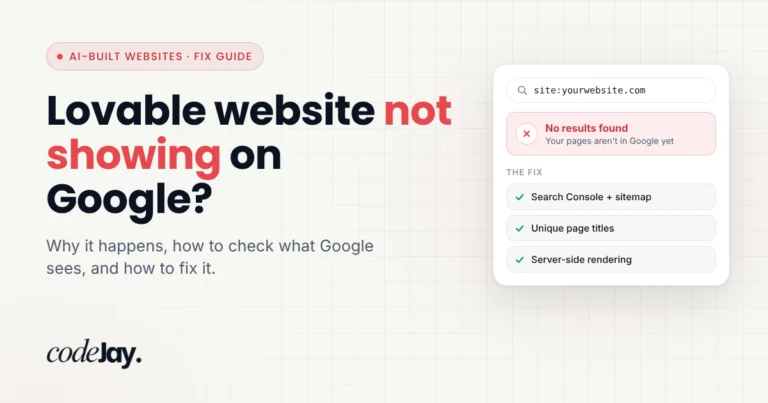
- Put important information in real text. Prices, services and opening hours shouldn’t live only inside images, PDFs or slow JavaScript. This is a common problem with AI-built sites, which I explain in why a Lovable website doesn’t show on Google.
- Keep it fast on phones. A slow, clunky page is a poor answer, for people and for Google.
2. Answer your customers’ real questions#
First, write down the questions customers ask you on the phone or by email. Then answer each one clearly on your website, ideally in the first two sentences of a section. Use the words your customers use, not industry jargon.
Also, cover the whole decision. AI Mode often gets questions like “how much”, “how long”, “which is better” and “who is it for”. If your pages answer all four, you give Google far more reasons to use your site.
3. Prove you’re a real, trusted business#
- Show who’s behind the business. Use a real About page with your name, location, experience and photos.
- Keep your details the same everywhere. Your business name, address and phone number should match on your website, your Google Business Profile and directories.
- Complete your Google Business Profile. Add your services, photos and opening hours, and keep asking happy customers for reviews.
- Get mentioned on other websites. Industry directories, local news, partners and suppliers all help Google trust you.
4. Track the numbers that matter#
Since Search Console mixes AI Mode clicks into normal search data, also track enquiries, calls and sales. And simply ask new customers how they found you. It’s the easiest way to see whether AI search is already sending you work.
Why the way your website is built matters for Google AI Mode#
This is the part most articles skip. Two websites can say the same thing, yet one is far easier for Google to understand.
Many template and builder sites load heavy code, repeat the same template text on every page and hide content behind sliders or scripts. As a result, Google has to work harder to pull out a clear answer. In contrast, a well-built custom website gives Google clean pages: one clear heading, short sections, real text, fast loading and structured data that matches what visitors actually see.
That’s why I recommend a custom-designed front end with a WordPress back end for most growing businesses. You still edit your content in WordPress, but the pages people and Google see are lean, fast and organised around your customers’ questions. You can read more on my custom website design page.
What doesn’t work#
- Special AI files or code. Google says you don’t need any extra files, AI text files or special schema to appear in AI Mode. My own site has an llms.txt file for other AI tools, but it won’t get you into Google’s AI answers.
- Keyword stuffing. Repeating “best plumber Melbourne” twenty times makes your page worse, not better.
- Hundreds of thin AI-written pages. Pages that say nothing new rarely get used as a source.
- Anyone who guarantees you a spot. Nobody controls what Google AI Mode shows. Be careful with “AI ranking packages” that promise one.
Google AI Mode in Australia#
Google AI Mode started rolling out in Australia in October 2025, in English. So if you run an Australian business, your customers can already use it on their phones and laptops.
A few things matter more here than people expect:
- Suburbs, not just cities. Australians search by suburb, like “electrician in Parramatta” or “café website designer in Fitzroy”. Make sure your website and Google Business Profile clearly list the areas you actually serve.
- Prices in Australian dollars. AI answers often mention price ranges. If you publish clear AUD prices, including GST, you give Google your real numbers instead of a guess from someone else’s site.
- Local reviews and directories. Google reviews matter most. After that, keep your details accurate on Australian directories such as True Local, Hotfrog and Yellow Pages.
- A local domain. A .com.au domain tells people and Google you’re an Australian business. My guide to .com.au vs .au explains which to choose.
If you’re an Australian business that wants help with this, my Australia page explains how I work with clients from Perth to Brisbane.
Common questions#
Is Google AI Mode free?#
Yes. It’s part of normal Google Search, so anyone can use it without paying or signing up.
Is Google AI Mode available for everyone?#
It’s now available in most countries, including Australia, the UK and the US. Google rolled it out country by country through 2025, so some features still reach certain regions first.
How do I turn on AI Mode in Google?#
Search on Google as usual, then tap the “AI Mode” tab near the top of the results. To go back to normal results, simply choose the “All” tab.
How do I get my business into Google AI Mode?#
Make sure Google can index your website, answer your customers’ questions clearly, keep your Google Business Profile complete and build genuine reviews. There’s no form to apply, and you can’t pay to be quoted in the answer itself.
Does Google AI Mode affect SEO?#
Yes, but it doesn’t replace it. Google says the same SEO basics apply to AI Mode, so good SEO still matters. What changes is that simple questions get answered inside Google, while detailed, trustworthy pages win the clicks.
Do I need llms.txt or special schema for Google AI Mode?#
No. Google says no extra files or special structured data are needed. Still, structured data that matches your visible content helps Google understand your pages in normal search too.
How I can help#
I’m Jay, a Melbourne-based freelance web developer and UI/UX designer, and a Fiverr Pro with a 4.9 rating from more than 350 reviews. I build custom websites that are fast, clearly structured and ready for both normal Google search and its AI answers, for businesses in Australia and around the world.
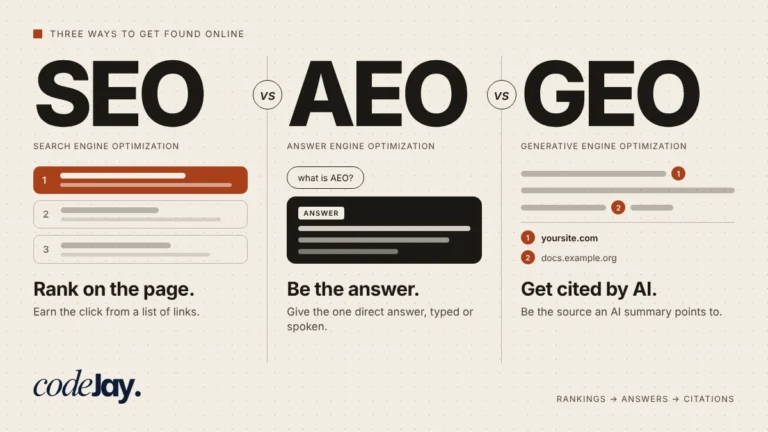
If you want to know where your website stands, I can check how Google reads it, fix what’s holding it back and help you answer your customers’ questions properly. You’ll get a clear plan and a fixed price before any work starts. You can also see my answer engine optimization and generative engine optimization services.
Get your website ready for Google AI Mode on Fiverr
Sources#
- AI features and your website, Google Search Central