Best Website Builder for 2027: Wix vs Squarespace vs Shopify vs WordPress

Translate
Read this page in
- Español
- Français
- Deutsch
- Italiano
- Português
- Nederlands
- Polski
- Svenska
- Ελληνικά
- Türkçe
- Русский
- Українська
- العربية
- עברית
- فارسی
- हिन्दी
- বাংলা
- اردو
- සිංහල
- தமிழ்
- नेपाली
- 简体中文
- 繁體中文
- 日本語
- 한국어
- Tiếng Việt
- ไทย
- Bahasa Indonesia
- Bahasa Melayu
- Filipino
- Kiswahili
Translated by Google in a new tab. Pick any other language from Google’s bar at the top of that page.
On this page10 sections
- Website builders compared: prices and features for 2027
- Each website builder in more detail
- Best website builder for each type of site
- Best website builder in Australia
- How to choose the right website builder
- When a website builder isn’t enough
- The better option: a custom front end with a WordPress back end
- Common questions
- How I can help
- Sources
The best website builder depends on what your website needs to do. There’s no single winner, but there is a clear best pick for each kind of site:
- A simple business or portfolio site you’ll run yourself: Squarespace (from US$19 a month) for polished design, or Wix (from US$17 a month) for the most flexible editor.
- An online store: Shopify (from US$29 a month).
- A blog or content site on a budget: WordPress.com (from US$4 a month).
- The smallest budget: Hostinger Website Builder (from US$2.99 a month on a 4-year plan).
- A site built to grow, rank and last: skip the builder. A custom front end with a WordPress back end costs more upfront, but there’s nothing to outgrow and you own all of it. More on that below.
I’m Jay, a freelance web developer who builds websites for businesses, brands and individuals around the world. I work with WordPress every day, so I’ll be upfront about when a website builder is the right choice and when it isn’t.
Prices are in US dollars a month, billed yearly, as listed in late 2026. Australian prices are in their own section below. Builders change their prices often, so check before you buy.
Website builders compared: prices and features for 2027#
| Builder | Plans from (US$ a month, billed yearly) | Best for | Watch out for |
|---|---|---|---|
| Wix | Light $17, Core $29, Business $39 | The most flexible drag-and-drop editor and lots of add-on apps | Store features vary by plan; you can’t move your design to another platform |
| Squarespace | Basic $19, Core $29, Plus $49 | Polished, design-led sites for services, portfolios and hospitality | Basic charges a 2% fee on product sales; fewer apps than Wix |
| Shopify | Basic $29, Grow $79 | Online stores of any size | Paid apps add up; more than you need if you don’t sell online |
| WordPress.com | Personal $4, Premium $8 | Blogs and content-heavy sites on a budget | More to learn than Wix or Squarespace |
| Self-hosted WordPress | Hosting about $10–$100, plus a domain | Sites you want to grow, rank and own completely | Needs updates and security care; usually built by a developer |
| Hostinger Website Builder | $2.99 on a 48-month plan | The cheapest way to get started | The low price needs a 4-year plan and goes up when it renews |
| Custom front end + WordPress back end | A one-off build, then hosting | Brands that want a unique, fast site they fully own | Costs more upfront; needs a developer to build and look after it |
All of the builders include hosting, mobile-friendly templates and basic SEO tools. The real differences are how far each one can grow with you, what selling online costs, and how easily you can leave.
Each website builder in more detail#
Wix: the most flexible editor#
Wix lets you drag anything anywhere on the page, and its app market covers bookings, events, online stores and more. Its Business plan ($39 a month) is the one Wix recommends for selling, with payments and standard eCommerce included.
Choose it if you want full control over the layout without code. Skip it if you might move platforms later, because a Wix site can’t be exported to another builder.
Squarespace: the best-looking templates#
Squarespace’s templates look professional straight away, which suits cafes, consultants, photographers and other design-led businesses. On the Basic plan, product sales carry a 2% transaction fee; from Core ($29 a month), that fee drops to 0% for physical products. There’s a 14-day free trial but no free plan.
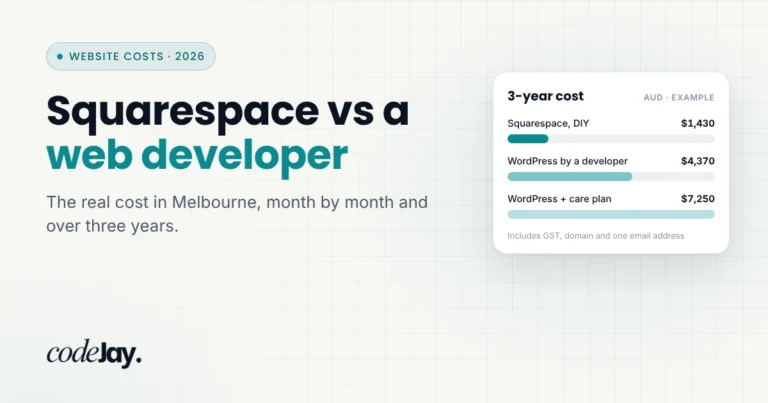
Choose it if design matters most and your site is fairly simple. Skip it if you need lots of add-ons. For the full cost over three years, see Squarespace vs a web developer: the real cost.
Shopify: the best for online stores#
Shopify is built for selling. Inventory, checkout, shipping and in-person sales all work together. Basic costs $29 a month billed yearly ($39 billed monthly), and in the US, online card payments on that plan cost 2.9% + 30c. Card rates are different in each country.
Choose it if your website is mainly a shop. Skip it if you sell only a few things, because Wix or Squarespace can run a small shop alongside the rest of your site.
WordPress: the most control and ownership#
WordPress powers more than 40% of all websites, and it comes in two forms. WordPress.com is a hosted builder from $4 a month. Self-hosted WordPress (the free software from WordPress.org) runs on your own hosting, where you own every file and can move hosts whenever you like. Self-hosted WordPress is what most developers, including me, build business websites on.
Choose it if you want to grow content, rank on Google and never be locked in. Skip it if you don’t want to think about updates; someone has to keep WordPress, its plugins and PHP up to date. See is my WordPress website safe?
Hostinger Website Builder: the cheapest start#
Hostinger’s builder starts at $2.99 a month, but only on a 4-year plan paid upfront, and the price goes up when the plan renews. The lowest prices are often sale offers, so check what you’ll pay after the first term.
Choose it if budget is the deciding factor and you’ll keep the site simple. Skip it if you expect the site to grow, because you’ll likely rebuild it later.
Best website builder for each type of site#
Best website builder for small business#
For most small businesses that want to run the site themselves, Squarespace or Wix. Both can get a professional site live in a weekend, with bookings, forms and a few products on the mid-range plans. If your business depends on Google for new customers, or you plan to grow, start on WordPress or a custom build instead so you don’t have to rebuild later.
Best free website builder#
Wix and WordPress.com both have free plans, but they show the builder’s ads and use its address (wixsite.com or wordpress.com) instead of your own domain. That’s fine for testing an idea, not for a business. Squarespace has no free plan, only a 14-day free trial.
Best website builder for SEO#
Any of these builders can rank on Google if the content is good. For the most control over speed, page structure and schema markup, self-hosted WordPress is the strongest choice, and a custom front end with a WordPress back end goes further still. Clear, well-structured pages are also easier for AI search tools like ChatGPT, Gemini and Google’s AI Overviews to understand and quote.
Best website builder for ecommerce#
Shopify, by a long way, if selling is the main job of your website. If you only sell a few products alongside a service, Squarespace or Wix lets you do that without running a second platform.
Best AI website builder#
Wix, Squarespace, Shopify and Hostinger all have AI tools that draft a whole website from a short description. They’re a fast way to get a first version, but the result still needs checking for wording, security, forms, speed and SEO before it goes live. See what is vibe coding and the 7 things to check on an AI-built website.
Best website builder for photographers and portfolios#
Squarespace. Its templates are built around large images and galleries, which suits photographers, artists, designers and other creatives.
Best website builder for beginners#
Squarespace has the gentlest learning curve. Wix is a close second and gives you more freedom over the layout.
Best website builder in Australia#
If you’re in Australia, the picks above still apply. What changes is the price, GST and a few local details. Here’s what each builder charged in Australian dollars when I checked on 3 November 2026, billed yearly:
| Builder | Plans from (AUD a month, billed yearly) |
|---|---|
| Wix | Light $17, Core $29, Business $39 (incl. GST) |
| Squarespace | Basic $17, Core $28, Plus $49 |
| Shopify Australia | Basic $50, Grow $134 |
| WordPress.com | Personal $6, Premium $12 (excl. taxes) |
| Hostinger Website Builder | $2.99 on a 48-month plan (A$143.52 upfront), then $15.89 a month on renewal |
A few things to know when you build a website in Australia:
- Compare prices with GST included. Some builders show Australian prices with GST and some without, so check before you compare.
- Card fees for selling online. Shopify’s Australian online card rate starts at 1.7% + 30c on Basic, and Squarespace’s starts at 1.8% + A$0.30.
- Your domain. A .com.au needs an Australian connection, such as an ABN. See .com.au or .au: which domain should your business get?
- Where your site is hosted. On Wix and Squarespace, the builder decides where your site is hosted. Self-hosted WordPress or a custom build can run on Australian servers or a network with Australian locations, so pages load faster for local visitors.
- Australian law still applies. Whichever builder you use, rules like the Spam Act still cover your contact forms and email lists.
If you’d rather have it built for you, I build websites for businesses all over Australia. See freelance web developer Australia.
How to choose the right website builder#
Answer these five questions and the choice usually makes itself.
- Will you sell online? For a real shop, choose Shopify. For a handful of products or bookings, Squarespace Core or Wix Business is enough.
- Who will build and update it? If it’s you, pick the editor you find easiest; most offer a free plan, a free trial or a money-back guarantee. If it’s someone else, ask what they’ll build it on and why.
- How much does Google matter? All of these builders have basic SEO tools. WordPress gives you the most control over speed, structure and content as the site grows.
- Will you outgrow it? Moving off Wix or Squarespace means rebuilding your site from scratch. If you expect to grow, it’s cheaper to start on a platform that can grow with you. Here’s how to redesign a website without losing your Google rankings.
- What will it cost over three years, not one month? Add the plan, your domain, email, paid apps and transaction fees. A $17 plan can cost far more once those are added.
When a website builder isn’t enough#
Website builders are great for getting online quickly. They start to hold you back when:
- You need features the builder doesn’t offer, such as custom bookings, member areas or a link to your CRM.
- You want a design that doesn’t look like a template.
- Your site is growing past 20 or 30 pages, or you need full control over speed and SEO.
- You’re spending more time fixing the website than running your business.
If you’re weighing a builder against hiring someone, compare the full cost over three years, not just the monthly plan. In Australia, most small business websites built by a freelancer cost A$2,000 to A$10,000; see my website cost guide.
The better option: a custom front end with a WordPress back end#
If your website matters to your business, I’d skip the builder altogether. The setup I recommend splits the site in two:
- The back end is WordPress. You log in to the familiar WordPress editor to add pages, posts, products and images. WordPress is open source, so your content is never locked into one company.
- The front end is built just for you. Everything visitors see is designed and coded for your brand, instead of coming from a template or a drag-and-drop page builder. It pulls your content from WordPress through its built-in REST API, which WordPress made so your content can be used in “completely separate applications”.
This setup is often called headless WordPress. You get the easy editing of WordPress with the speed and freedom of a fully custom website.
Why it beats a website builder#
- A design no one else has. No template to work around and no limits on the layout.
- Faster pages. A lean, hand-coded front end loads without the extra code that builders and page builders add, and pages can be served from locations close to your visitors, wherever they are in the world.
- More control over SEO and AI search. You control the headings, page structure, schema markup and speed of every page, which helps Google and AI tools like ChatGPT and Gemini understand your business.
- You own all of it. Your content lives in WordPress, the code is yours, and you can change hosts or developers without starting again.
- Safer by design. The WordPress login can sit apart from the public website, so visitors never touch your admin area.
- Room to grow. Bookings, member areas, a link to your CRM or a second language can be added without hitting a plan’s limits.
| Website builder | Custom front end + WordPress back end | |
|---|---|---|
| Design | Based on a template | Designed and coded for your brand |
| Speed | Limited by the platform | Lean code, served close to your visitors |
| SEO control | Basic tools | Full control over every page |
| Ownership | You rent the platform | You own the code and the content |
| Moving later | Rebuild from scratch | Change hosts or developers anytime |
| Upfront cost | Low | Higher |
| Editing content | The builder’s editor | The WordPress editor |
The trade-offs#
- It costs more upfront than a builder plan, and it needs a developer to build it.
- WordPress plugins that change the public site, such as page builders and some form or pop-up plugins, need custom work to show up on the front end.
- Content previews and forms have to be set up as part of the build.
For a three-page site you need live this week, a builder is fine. For a website you’ll rely on for years, a custom front end on WordPress is the better long-term investment.
Common questions#
What is the best website builder for 2027?#
There’s no single best website builder. Squarespace is best for polished, simple sites, Wix for the most flexible editor, Shopify for online stores and WordPress for sites that need to grow. If your website is central to your business, a custom front end with a WordPress back end beats all of them in the long run.
Which website builder is best for small business?#
Squarespace or Wix, for most small businesses that want to run the site themselves. If you rely on Google for new customers or plan to grow, start on WordPress so you don’t have to rebuild later.
Is WordPress better than Wix or Squarespace?#
WordPress gives you more control, more features and full ownership, but it takes more to learn and look after. Wix and Squarespace are easier to start with but harder to grow or leave. For a long-term business website, WordPress usually wins.
Which is better, Wix, Squarespace or Shopify?#
Shopify if you’re mainly selling products, Squarespace if design matters most, and Wix if you want the most freedom over the layout and add-on apps.
What is the cheapest website builder?#
Hostinger Website Builder, from $2.99 a month on a 4-year plan, in both US and Australian dollars. Wix and WordPress.com have free plans, but they show ads and don’t let you use your own domain.
Can ChatGPT build a website?#
ChatGPT can write the words and code for a website, and builders like Wix and Hostinger have AI tools that draft a whole site from a prompt. You still need hosting, a domain and someone to check security, forms, speed and SEO before launch.
How much does it cost to build a website in Australia?#
On a website builder, the plan usually costs about A$200 to A$600 a year, plus your domain and any paid apps. A small business website built by a freelancer usually costs A$2,000 to A$10,000. See my website cost guide.
What is headless WordPress?#
Headless WordPress means using WordPress only to manage your content, with a separate, custom-built front end that shows that content to visitors. You keep the familiar WordPress editor and get a faster, fully custom website.
How I can help#
Not sure whether a builder or a custom build is right for you? I’ll give you an honest answer, even if that answer is “Squarespace is fine”. If you’d rather have it built properly, I design and build custom front ends on WordPress for businesses, brands and individuals in Australia and around the world.
Send me what you need on Fiverr and I’ll reply with a plan and a quote.