How to Create a Website for Your Business: Which Approach Is Right for You?
Not sure which approach to take when creating a website for your business? As a freelance web developer with over 8 years of experience, I break down bought templates, website builders, and my 3 stage custom website process so you can choose what fits your business.

Translate
Read this page in
- Español
- Français
- Deutsch
- Italiano
- Português
- Nederlands
- Polski
- Svenska
- Ελληνικά
- Türkçe
- Русский
- Українська
- العربية
- עברית
- فارسی
- हिन्दी
- বাংলা
- اردو
- සිංහල
- தமிழ்
- नेपाली
- 简体中文
- 繁體中文
- 日本語
- 한국어
- Tiếng Việt
- ไทย
- Bahasa Indonesia
- Bahasa Melayu
- Filipino
- Kiswahili
Translated by Google in a new tab. Pick any other language from Google’s bar at the top of that page.
On this page12 sections
- 3 ways to create a website for your business compared
- Way 1: Buy a ready made template (The budget option)
- Way 2: Use a website builder with ready made templates
- Way 3: Build a fully custom website (The 3 stage process)
- What about online stores? How WooCommerce and Shopify fit these 3 ways
- Why a custom website wins in the age of AI search
- How much does it cost to create a business website?
- Quick checklist before you launch your business website
- Creating a business website in Australia
- Common questions
- How I can help
- Sources
Creating a website for your business comes down to three main paths. You can buy a ready made template, use a website builder, or invest in a fully custom website. The right choice depends on your budget, how much time you have, and how you plan to get customers.
The short answer:
- Way 1: Buy a ready made WordPress theme (Budget option). Good if your budget is tight and you do not mind adjusting your content to fit an existing layout.
- Way 2: Use a website builder template (Wix, Squarespace, or basic Shopify). Quick to launch yourself, but you are stuck with their design limits, slower mobile speeds, and monthly fees forever.
- Way 3: Build a fully custom website (UX research, UI design, and custom development). The best long term choice if budget is not a major concern. It scales to any size, loads fast, and ranks much better on Google and AI search tools like ChatGPT.
I’m Jay, a freelance web developer and UI/UX designer with over 8 years of experience. I build custom small business websites for businesses around the world every day. Here is an honest breakdown of the three ways to create a business website, how eCommerce fits in, and which option actually pays off.
3 ways to create a website for your business compared#
Before you spend any money, compare what you actually get with each approach.
| What to compare | 1. Bought WordPress template | 2. Website builder (Wix / Squarespace) | 3. Fully custom website |
|---|---|---|---|
| Upfront cost | $60 to $150 for the theme (or $500 to $2,000 if a freelancer sets it up) | $0 upfront, then $17 to $65+ per month forever | $1,500 to $8,000+ once off with a freelancer |
| Design freedom | Locked to the theme layout | Locked to ready made blocks and templates | 100% custom designed around your brand in Figma |
| Can it scale later? | Limited by theme plugins | Hard to scale; you cannot move your code elsewhere | Huge scalability (from WordPress back ends to full custom web apps) |
| Mobile speed | Average (often slowed down by unused theme features) | Often slow due to heavy platform scripts | Fast, lean code tuned for Google Core Web Vitals |
| Google & AI search (AEO/GEO) | Good with cleanup, though code can be messy | Basic SEO only; restricted schema and locked root files | Built for Google, ChatGPT, and AI Overviews from day one |
| Who owns the site? | You own it | You rent it from the platform | You own 100% of the design, code, and data |
Still deciding if you even need to get online yet? Read my honest guide on whether your business still needs a website.
Way 1: Buy a ready made template (The budget option)#
If you want to own your website on a tight budget, buying a ready made WordPress theme (from marketplaces like ThemeForest or Astra) is a common starting point. You buy a template for around $60 to $150, install it on your own hosting, and swap in your logo, text, and photos.
Where bought templates work well#
- Low starting cost: You avoid paying for custom design from scratch.
- You still own the site: Unlike closed builders, the site sits on your own WordPress hosting account.
- Fast to launch: If your content matches the demo layout, you can go live quickly.
The catch with bought templates#
Theme authors build templates to sell to thousands of different businesses. To do that, they pack one theme with dozens of sliders, animations, and page layouts you will never use.
All that extra code slows down your pages on mobile phones. You also have to squeeze your business story into someone else’s boxes. If you try to change the structure too much, the layout often breaks when plugins update.
Way 2: Use a website builder with ready made templates#
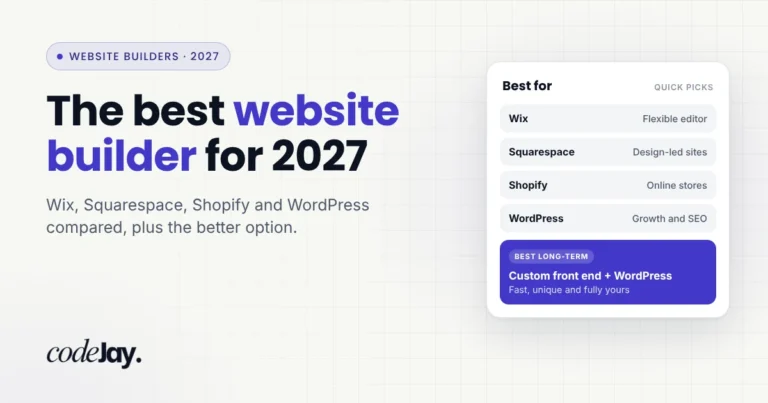
Many new business owners start by looking at website builders like Wix or Squarespace. These platforms give you a library of ready made templates, hosting, and an editor for one monthly subscription. You can see how each platform stacks up in my comparison of the best website builders.
The hidden issues with website builders#
Builders look cheap and easy on day one. However, most growing businesses hit three major walls within a year or two:
- You cannot customise as needed: You are stuck inside the template grid they give you. When you want a specific booking flow, a custom pricing calculator, or a unique mobile layout for your customers, the builder simply cannot do it.
- You cannot scale up easily: As your traffic and service pages grow, builders become restrictive. Worse, you cannot export your code. If you outgrow Wix or Squarespace, you have to throw the site away and pay to rebuild it from scratch.
- Slow speed and weak AI search visibility: Because builders load heavy background scripts on every page, they often struggle with mobile speed scores. You also cannot access your root server folder to add AI discovery files like llms.txt or advanced custom schema. See my breakdown of Squarespace vs hiring a web developer for the real three year cost.
Way 3: Build a fully custom website (The 3 stage process)#
As a web developer with over 8 years of experience, I always recommend a fully custom website if your budget allows it. Instead of forcing your business into a ready made template, we build the entire website around your customers and your business goals.
A proper custom website is not just coding. It follows three clear stages:
Stage 1: UX research (User Experience)#
Before drawing a single box, we look at your customers. Who are they? What questions do they ask before they call or buy? What makes them trust you over a competitor?
We map out your page structure, navigation, and calls to action based on real customer behaviour. That way, visitors find what they need in seconds without getting lost.
Stage 2: UI design in Figma (User Interface)#
Next, I design every key page from scratch in Figma for both mobile phones and desktop screens. We create a visual look that matches your brand, using clear typography, colour contrast, and trust signals.
You see the exact design and click through an interactive prototype before any coding starts. We refine it until you are 100% happy. Explore my UI/UX design services to see how this stage works.
Stage 3: Custom development and choosing your tech stack#
Once you approve the Figma design, the biggest benefit of a custom website is how far it can scale. You are not locked into one way of building. Instead, we choose the exact setup that fits your budget and your future plans:
- Custom front end + WordPress back end (Best for middle range budgets): This is the sweet spot I recommend for most small and medium businesses. Your visitors get a 100% custom coded front end that looks unique and loads fast. Behind the scenes, you get the familiar WordPress website dashboard. It gives you the best usability and makes it easy to edit your own text, images, and blog posts without paying for a full custom admin system.
- Full custom front end + custom back end (No WordPress needed): If you are building a large platform, a SaaS product, a booking engine, or a client portal, you do not have to use WordPress at all. We can build both the front end and the back end from scratch using React, Angular, and custom databases. Explore my custom web applications service to see what is possible.
Because we write only the code your website actually needs, pages open almost instantly on mobile phones and pass Google Core Web Vitals from day one.
What about online stores? How WooCommerce and Shopify fit these 3 ways#
If you sell products online, eCommerce websites follow these exact same three paths.
- 1. Bought eCommerce templates: You can buy a ready made WooCommerce theme or a paid theme from the Shopify Theme Store. It keeps upfront costs low, but your store looks like hundreds of other shops and often slows down once you add apps and product filters.
- 2. Standard builder setups: You can set up a basic Shopify store using a free default template and visual apps. This works well for testing a new product, but monthly app fees add up fast and you cannot easily change the checkout or product page logic.
- 3. Custom WooCommerce or custom Shopify builds: If you want higher conversion rates and a store built to scale, we use the same 3 stage custom process (UX research, Figma UI design, and custom development). You can run a custom designed front end powered by WooCommerce (for full ownership and zero platform transaction fees) or a custom Shopify theme (or headless React front end) tailored to how your customers actually shop.
Why a custom website wins in the age of AI search#
With AI tools like ChatGPT, Gemini, Perplexity, and Google AI Overviews changing how people search everywhere, a custom website gives you an even bigger advantage.
When people search today, AI tools scan websites to decide which business to recommend. AI crawlers do not care about flashy builder animations. They look for clean HTML code, fast load times, clear pricing tables, verified schema markup, and root files like llms.txt.
On a custom website, we engineer all of this into the code during Stage 3. We link your business details, your services, and your customer reviews into custom JSON LD schema so Google and ChatGPT trust your business immediately. Read my guide on how to get your business recommended by ChatGPT to see why this matters so much today.
How much does it cost to create a business website?#
People often search for how to create a business website for free. While free plans exist on builders, they put the builder’s ads on your site and give you a subdomain (like yourbusiness.wixsite.com). For a real business, that hurts customer trust more than having no website at all.
Here is what small businesses typically pay across the market:
- DIY website builder or bought template: $200 to $600 per year in domain, hosting, or subscription fees, plus your own time.
- Freelancer setup using a template: $500 to $2,000.
- Custom front end with WordPress or WooCommerce/Shopify back end: $1,500 to $8,000 with an experienced freelance developer.
- Full custom web app (custom front end and custom back end): $5,000 to $25,000+ depending on features.
For a full breakdown of every cost, read my website cost guide. If you are ready to compare quotes, follow my guide on how to hire a web developer for your small business.
Quick checklist before you launch your business website#
Whichever path you choose, every business website needs three essentials in place:
- Your own domain name and hosting: Always register your domain name (.com, .co.uk, .com.au, or your local extension) under your own account so you control your brand.
- Clear calls to action and trust signals: Make sure every page shows real customer reviews, clear pricing or service details, and an easy way to contact or book you.
- Fast mobile speed: Over 60% of web traffic comes from mobile phones. Test your site with my free website speed & SEO test to make sure slow pages are not costing you leads.
Creating a business website in Australia#
If your business is based in Australia, the same three website options apply, along with a few local rules to keep in mind:
- Register a .com.au or .au domain: A .com.au or .au web address requires an active ABN or ACN and shows local customers right away that you are a genuine Australian business. Read my guide on .com.au vs .au: which domain should your business get? to pick the right one.
- Typical Australian prices (AUD): Across Australia, a bought template setup with a freelancer usually costs $800 to $2,500 AUD, while a custom small business website ranges from $2,000 to $8,000 AUD. See my full Australian website cost guide for local pricing breakdowns.
- Australian Consumer Law and Spam Act: Keep your displayed prices (including GST) and service claims accurate under Australian Consumer Law, and include clear consent and an unsubscribe link on any marketing email forms.
- Big opportunity to stand out locally: According to auDA’s Digital Lives of Australians report, only 56% of Australian small businesses have a dedicated website. A fast, custom website puts you well ahead of nearly half of your local competitors.
Common questions#
How can I create a website for my business for free?#
You can use a free plan on platforms like Wix, WordPress.com, or Canva, or set up a free Google Business Profile. However, free website plans place ads on your pages and do not let you use your own custom domain name. For a professional business, paying for your own domain and hosting is always worth it.
What do people on Reddit recommend for creating a small business website?#
In small business communities like r/smallbusiness and r/Entrepreneur, business owners consistently recommend self hosted WordPress or WooCommerce over closed website builders. The main reasons are full ownership, lower long term costs, better SEO control, and not being locked into rising monthly subscription fees.
Should I use WordPress or a full custom back end for my custom website?#
For most small and medium businesses, a custom coded front end with a WordPress back end is the smartest middle budget choice. You get a fast, custom design while keeping an easy to use admin area. You only need a full custom back end (without WordPress) if you are building a complex web app, custom portal, or software platform.
Can I update a custom website myself after launch?#
Yes. When I build a custom website on WordPress, WooCommerce, or Shopify, I lock the design layouts so nothing can break, and give you simple fields to change text, prices, products, and images yourself. I also record a walkthrough video at handover so you feel confident running your site.
How long does it take to build a custom business website?#
Most custom small business websites take two to three weeks from brief to launch. Week 1 covers UX planning and Figma UI design for your approval. Week 2 covers custom development, mobile testing, Core Web Vitals speed tuning, and SEO setup before launch.
How I can help#
Not sure whether your business needs a simple starter site, a custom WordPress build, or a full custom web application? Send me a quick message about what your business does and what you want your website to achieve. I will give you an honest recommendation based on 8+ years of building websites for clients worldwide.
If you want a website that looks sharp, loads fast on every phone, and wins customers from Google and AI search, I handle the entire process from UX research and Figma design to development and SEO.
Ask me on Fiverr and I’ll reply with honest advice, a clear plan, and a fixed price.
Sources#
- Stanford Web Credibility Research: How design affects business trust
- W3Techs: Usage statistics and market share of WordPress
- Google Search Central: Understanding Core Web Vitals and page experience
- BrightLocal: Local Consumer Review Survey
- Princeton University, Georgia Tech & Allen Institute for AI: GEO: Generative Engine Optimization
- auDA: Digital Lives of Australians